Showing posts with label nerdery. Show all posts

May 9, 2010

Dumbjacking

One of my Facebook buddies got hit with an attack today that spammed his entire friends list with a link to a "fan page". The page promises "LOOK AT HIS COMMENT.. IM STILL IN SHOCK!!" and gives you a button to "see the worst status update ever". When you click it, you are given a series of commands: hit Ctrl-C, then hit Alt-D, then hit Enter.

Unbeknownst to the user, there is a hidden textfield on this page containing Javascript code. Upon clicking the button these contents are automatically selected. The instructions, when followed, result in the user copying the code and pasting it into their address bar, where it runs like a bookmarklet. You can see a deconstruction of the code in question in this blog post. The Javascript is obfuscated, but there's no technical need for that - probably just a scammer trying to protect his secret.

Having the user copy and paste the Javascript into their address bar breaks out of the sandbox for third-party content, allowing full control over the user's account. The code uses this power to silently mark the user as "liking" the offending page, and sends a message to all their friends "suggesting" the page.

The Facebook page in question has been taken down, but at the end of the process the user is linked to this URL to see the promised status update (I don't recommend visiting it):
http://facebook-lmao.blogspot.com/2010/05/shocking-status-update-guy-needs.html

There is some invasive Javascript going on that tries to con you into taking a survey. Presumably this is the motivation behind this attack - get people to this site and then relieve them of their money through a venerable internet scam of one type or another. Interestingly, if you can make it past the survey (thanks, Firebug), there's a link to this post, which seems to be a legitimate and unaffiliated blog.

Lord knows Facebook has had their share of security fails in the past, but this particular technique seems to have surfaced only recently. I am christening it Dumbjacking, because it's like Clickjacking, but dumber. It relies on tricking the user into doing something dumb, like pasting Javascript into their address bar.

But here's the problem: this technique is nothing if not effective. As of writing this, the page I investigated had 15,571 people who "liked" it. It seems dumb, but for someone who has no idea about "Javascript" or "URLs" or "the address bar", the shady sequence of keypresses means nothing and raises no red flags. In fact, a decade of awful usability in web apps has trained people to find arcane instructions like "Press CTRL and C" mundane, a normal part of using websites.

Dumbjacking is never going to be completely preventable. There will always be gullible, confused people who will blindly follow any number of steps (remember the old IRC Alt-F4 gag?) and somehow compromise their accounts or other information. We can't prevent all of it.

But a large part of the responsibility lies with Facebook's awful app model. The idea of allowing third-party HTML (and worse, sandboxed JS) to sit right inside pages on the official Facebook site is just terrible. I don't think they have accurately assessed the threat of "native styling" - that is, third-party widgets that look exactly like real Facebook widgets. There's no indication of where Facebook-sanctioned content ends and third-party code begins. Give users a button that looks like a Facebook button, and they will click it. Give users incomprehensible instructions on a Facebook page with the promise of something outrageous at the end, and they will follow them to the letter.

Can a site prevent every instance of users doing something stupid? Of course not. But the Facebook app system is just making it easy for scammers. Embedded content means you can launch your attack from the cozy confines of Facebook itself, and Facebook's mission to plaster those stupid "Suggest this to a friend" buttons across every corner of the earth means there will be no shortage of new attack vectors.

The technical decisions coming out of Facebook are the decisions of a company interested in monetizing as much as possible instead of doing right by their customers. There will be no end of security and privacy problems surfacing on Facebook. As far as I'm concerned, it should be treated as a site that is always compromised, where all information is public, and no content is trusted. Want to stay safe on Facebook? Use it as little as possible.

April 22, 2010

Facebook Hates Old People

So I was on Facebook, inspired by their latest round of privacy fail to clean out the last vestiges of personal profile information on my account. I decided that altering my birthday to give myself a bit more age might lend me a certain air of respectability. But to my surprise, upon setting my birthday to 1901, I saved my changes only to be informed that I had in fact been born April 22nd, 2010.


Cue "Born Yesterday."

"That's funny," says I. "December 14th 1901 works fine, but the 13th is no good at all, nor anything earlier than that!"


So if you're 109 years old and join Facebook, they won't let you show your birthday! Same goes for anyone older (I bet that 122-year-old is pissed). Seems pretty ageist, don't you think? And what's so bad about December 13th, eh? I mean, Ted Nugent was born on December 13th, but you can't hold that against the day itself...

Hang on, what's December 13th in Unix time?

$ date --date '1901-12-13' +%s
-2147536800

Well, I say! That's just a bit past -2147483648, which is... ah, that's right, -(2^31), or the lowest number that can be represented by a signed 32 bit integer. Guess we know how Facebook is storing their dates, eh? Too bad they didn't bother limiting the options on their date picker to match their technological limitations.

They must have some validation in place to prevent you from having a birthday in the future, so when the integer rolls over to a positive number, it just gets cut down to the current day. Pity, really. I was looking forward to being born on January 18th, 2038.

November 8, 2009

Avoiding disaster when using svn switch

So I was going to be my usual negative self again this month, but I created something, so I'll share that instead. Your regularly scheduled cynicism will return next month.

The problem


So you're working away on a branch of your project in SVN, and you need to switch to a different branch. svn switch does exactly that, but there's a catch. Say your repository has a top level with a README and CLI scripts and whatnot. But you've been hacking away in the src/ folder because that's where all the real code is. And you carelessly type svn switch svn://myrepo/branches/other_branch while your working directory is src/. What you should have typed was svn switch svn://myrepo/branches/other_branch/src - notice the subtle but important difference there.

As soon as you hit Enter, you've screwed the pooch. Remember, SVN doesn't know about branches - it just thinks they're all folders. So what you've done is tell it to switch the working directory, src/, to the top level directory of some other branch. It's going to delete everything in your folder and start checking out the whole root directory into your working directory. It's going to make a mess, then yell at you about conflicts and slotting and mismatches and you're probably going to end up getting frustrated and running rm -r on the whole folder. If there's a graceful way to recover from this mistake, I have yet to find it. I've done this enough times that I usually realize my mistake as soon as the first message pops up, and I often mash Ctrl-C in hopes of preventing further damage, but honestly I think that makes it worse.

After making this mistake for about the fiftieth time yesterday, I finally decided it would be in my best interest to protect me from myself, and so I wrote a bash script. It checks the directory (relative to the root of the branch) that you're asking to switch to against your current directory and won't let you continue if it thinks you're about to screw something up.

This script assumes that your repository follows the standard SVN repo format - your code should be in trunk or branches/branchname. And it assumes you're going to run svn switch on your current working directory - I didn't write any support for more than one argument.

Installing


Because of the nature of SVN commands, we have to wrap svn and just pass arguments for the other commands through untouched. Shawn Parker gets credit for the original inspiration. You'll need to put the below code in a file and make it executable. Then edit your .bashrc to add the following line:
alias svn='/path/to/script.sh'


September 23, 2009

Worse than Nothing

Want to get phished? Don't worry, it won't hurt.

If you have an account with Vanguard, the investment firm, you can experience it for yourself right here (works on IE7, IE8, or FF3). If not, you can watch a quick screencast of me phishing myself. Note that this is clearly not the Vanguard site, and yet after I enter my username, I'm shown my personal image (mine's a canoe! what's yours?). I didn't answer any security questions, and yet that's my personal image that only my bank and I are supposed to know. And here it is on some scammer's site. That's the unique part of my attack, and the most dangerous.

By the way, that screen at the end is where the scammer has just obtained your password and is happily emptying your bank account (since I'm nice, I just display a hash and don't save it).

I don't mean to pick on Vanguard, I just happened to have an account with them. A similar attack should be quite possible on Bank of America, HSA Bank, or anyone else who uses the SiteKey system. SiteKey is a scheme banks came up with in response to the large and largely-intractable problem posed by phishing. It's sometimes labeled as a "multi-factor authentication" system, but I think that's incorrect - it's more of a "mutual authentication" system. The site proves that they are legitimate by showing you a picture that you selected when you sign up. Since no one else could know what picture you have set, this proves that the site is who you think it is. At least, that's the theory.

My attack is simple. The first page is just a static page that looks exactly like Vanguard's home page - standard phishing fare. When you submit the form with your username, I build a page with an iframe pointing to the Vanguard site, passing it the username. As long as you've logged in from this computer before, the Vanguard site happily shows your personal image. Then I create a form outside of the iframe with a password field and a submit button, and float those elements over the iframe. So while you're seeing the Vanguard site in the background, you're entering your password into a form I control, and the submit button you click submits to my page. And just like that, I have your password.

I have your password. I did this with a freakin' Bachelor of Arts degree. It took me about three hours of messing around to get the basics set up, and another few hours to spit and polish. It's a couple of dumb HTML pages with a few snippets of PHP, and a pinch of Javascript thrown in. There is nothing sophisticated here. I don't think this even qualifies as a "hack." I think you should be concerned. This attack has been possible as long as SiteKey has been in existence, and I see no reason why I would be the only person to think this up. In all likelihood, some smart phisher out there is already doing this.

I learned retroactively that this technique is called UI Redressing, more commonly referred to as Clickjacking. It's behind a number of attacks, of which perhaps the most publicly visible (although not the most dangerous) was the Twitter "Don't Click" infection. Even worse, since my attack requires no clicking on the actual hidden elements, even NoScript's vaunted ClearClick technology doesn't detect it (NoScript does offer an opt-in to disable iframe content, which sounds like it should stop the attack, but it didn't work for me).

SiteKey was weak to begin with. It's bad enough that a vast majority of site users don't notice if the image is missing. And a weaker man-in-the-middle attack that involved asking security questions was demonstrated 3 years ago[pdf]. But this is worse. A malicious site that shows you your own handpicked image will lull you into a false sense of security. Who would think twice about providing personal information when that mountain stream or étouffée or whatever you picked is staring you right in the face? The banks have worked hard to train users to look for that image, and that very training can be turned against them to make phishing attacks even more successful than before. SiteKey is not just useless - it's worse than nothing at all.

I have been in contact with RSA Security, the vendors of SiteKey, about this attack. To their credit, they were very professional about the whole thing. They treated the matter seriously (I was surprised to get a response at all), and did not try to bullshit or bully me. So they get points for understanding how to make the vulnerability reporting process a productive one. They told me they have notified their clients about the problem and suggested corrective action. I imagine this action will consist of frame-busting Javascript and a proprietary IE8 header. I can only speculate because as of this posting, neither Vanguard nor HSA Bank have done anything to prevent the attack, even though it has been two months since I reported it. These changes will help, but the headers are opt-in and only work on newer browsers, and the Javascript isn't necessarily immune to circumvention. Besides, recall what I said about my qualifications as a security researcher. If I came up with this in a few hours of spare time, don't try to tell me there aren't similar attacks that could be discovered by a motivated person - say, someone who makes a living managing a phishing operation.

There's another reason I think SiteKey is worse than nothing. It's not just users who get a false sense of security from it - banks are biting on these supposed panaceas instead of facing up to the very difficult problem of performing real security. It's all too easy for companies to set arcane password rules and shell out money for "solutions" like SiteKey, and convince themselves that they've tried hard enough. Wrong. SiteKey is like a Mickey Mouse band aid on the wrong knee. Maybe it gets the three year old to stop crying, but it's not actually doing any good.

Epilogue

I know, I know, I'm such a negative person. Always bringing other people down. Complaining about what exists without offering any suggestions of my own. What would I propose to guard against phishing? Huh, tough guy?

I have to be honest - I don't see a silver bullet. Phishing is a serious threat, and one that preys on our inescapably human failings - inattention, belief that our perceptions are accurate, and willingness to adapt our actions to what we are presented with. I don't see it going anywhere any time soon. However, I think the Firefox address bar is a great start:
Firefox address bar
If we have to train users to look for something, it should be this. Benefits:
  • It's client-side. No man-in-the-middle. No UI redressing. Short of a serious Firefox exploit or SSL vulnerability, there's no faking this part of the address bar.
  • It comes (I assume) from the SSL certificate, which is a pretty okay security measure, and one that any respectable site dealing with sensitive information already uses.
  • It's friendly and distinctive - it's big and green and it tells you the name of the company.
  • It's right next to the address bar, which encourages one to also check the URL. This is the original best security measure, and one that eBay and others have been advocating for years. I should point out that the pretty little Locationbar² plugin is helping here as well by highlighting the domain name so it stands out against the rest of the URL.
Still, this only works if you think to look. The danger of phishing is that you get caught at the end of a long day, or when you're in a hurry, or when fucking PayPal actually has deactivated your account three times in the past and you're so annoyed by the prospect of a fourth that you get careless and don't check.

I've got another suggestion, but this one is a lot further from reality. This is what I think could be, if we would spend less time on fake security and more time on real security.

Imagine, if you will, a world where PGP is commonplace. That's right, I'm evangelizing again. Imagine every email you receive is signed, and you have an extensive trust network. When you open an account at a new bank, the rep hands you a piece of paper with instructions on downloading the bank's public key and a fingerprint to verify it. Because PGP is so common, your email client actually throws up a big red warning saying "Hey! This signature is untrusted!" whenever you get email from someone whose key you haven't imported. Suddenly you have a proactive warning on every phishing email that comes through. Nobody is going to click through a message from their bank that is labeled as "untrusted." You could teach your grandparents that.

Is this a pipe dream? For now, yeah. But it's a good one - it's a world where email phishing is essentially solved.

Until then, keep checking your address bar.

Update (12/03/09): Looks like at some point in the past few months, Vanguard updated their site with some frame-busting Javascript, and now hides the pages if Javascript is disabled (bad news for accessibility, but arguably more secure). However, let me reiterate: the fact that they have stuck their finger in this leak doesn't mean there aren't other holes in the dike.

Another update: I sent this article to Jim Youll, the author of the original paper on SiteKey vulnerabilities. He emailed me back, and in his response was a remark that stuck with me: "they always say that the undisclosed back-end systems are the fail-safe for the front-end attacks. I don't think they're lying." At some point, it hit me: what if SiteKey is nothing more than security theater? Maybe they do know that it's useless. Maybe they don't expect it to stop anything. Maybe whatever fee they're shelling out isn't coming from the security budget, but from the marketing budget. If this is the case, I just hope the marketing spiel isn't working on the people who need to be doing the real security.

August 7, 2009

Making Chroma-Hash Less Leaky

Prologue

Recently, Jakob Nielsen yelled at everyone that password masking is a usability problem. When that man yells, people listen, and so were planted the seeds for some interesting experiments in providing password hints. The sexiest of these so far is Mattt Thompson's Chroma-Hash.

Some valid security concerns were raised over this widget. Mattt has solved several of these already with his recent improvements. I'd like to examine one of the remaining issues and suggest a solution. You can view my fork on Github for the source code.

The problem

The scenario goes something like this: a user takes and shares a screenshot or screencast of their login screen with password typed in. Someone malicious views this and can garner information about the hashed password from the color bars. From here, I'm going to assume that you understand the basics of how MD5 is a one-way function and why that's important.
Chroma-Hash password box
In the standard operating mode, Chroma-Hash is pulling number values right from the MD5 hash. We can get the colors with an eyedropper, and look - they match up (in reverse order) to the first part of the hash of the salted password.

$ echo -n "hooray12:7be82b35cb0199120eea35a4507c9acf" | md5sum
4ea16c514a6697bce642ee2250aa92f6 -

If we were using five color bars, we would have disclosed almost the whole hash.

People keep bringing up the fact that MD5 is not considered a secure hash function any more. These concerns are misplaced. MD5 is considered broken because it's too easy to find collisions - things that hash to the same MD5 sum. This is useful indeed if you are wanting to forge a digitally signed certificate or tamper with transferred data. But unless the authentication server is using the exact same salt and hash algorithm as Chroma-Hash, creating a collision with someone's color bar hash is useless - you'll be able to get the same colors, but you won't be able to log in.

The real concern here is this: we've allowed an attacker to move the computational load onto their own hardware. When you control the password oracle, it's easy to limit the rate at which login attempts may be made. This makes a brute force attack or even a dictionary attack infeasible. The attacker can't try passwords fast enough to have a reasonable chance of guessing the right one within years. But when an attacker has a hashed result of your password, they can run a dictionary attack as fast as their hardware allows, and a matching MD5 from a dictionary attack is likely to be the right password, because let's face it, people in general don't choose secure passwords.

An aside: at the leading edge of server-side security, the equivalent threat of a stolen database is dealt with by bcrypt, a hashing scheme that can be tuned to be computationally intensive. So maybe the password check takes a tenth of a second instead of a thousandth - it's no big deal in the course of regular business, but it will significantly slow down an attacker trying to test a lot of passwords against stolen hashes. This strikes me as impractical for our purposes, and not only because we would need to implement bcrypt in Javascript. Tune it too strong, and a user running on slow hardware could suffer a bad performance hit when trying to type in their password. Tune it too weak, and an attacker with a couple dedicated cores could crank through at a fair clip.

My solution

In this case, I say collisions are actually our friends. If we can limit the information available to an attacker, we can leave them with a very large set of possible matches that they can only check by attempting to log in to the server. The point here is to make them verify against the server, rather than doing it at their own pace.

This is where another convenient fact comes into play. In his blog entry, Mattt points out that over-the-shoulder attacks won't be effective against Chroma-Hash.
As a color expressed in Hex, there are 16,777,215 possible colors for each bar. Eye-balling it wouldn’t be enough to get an exact color value—the difference between #952A08 and #952A09 is nearly imperceptible...
Those millions of possible colors come from 24 bits used to represent each color, which in turn is 24 bits of our hash leaked for every color bar. If we don't leak the information in some of those bits, our attacker cannot be as precise about identifying matches. And since humans cannot really differentiate all those colors anyways, we're losing almost nothing by eliminating some of the possibilities.

The best way to do this is to redact the low-order bits, so that we keep the entire color range and lose only the fine distinctions between shades. You can think of this like counting in multiples. Instead of every number being an option, we round to the nearest even number, or multiple of 16, or whatever we like. The more we round, the more information we can withhold from an attacker.

Let's see it in action.
Chroma-Hash password box
In this version, rgbStepSize is 2. You can see that the color values are very close to the original, but each 2-character hex number is even (0x96 = 150, 0xbc = 188, 0xe6 = 230, and so on). And since we're rounding, the attacker cannot know if the original hash contained "96" or "97", "bc" or "bd", etc.
Chroma-Hash password box
In this one rgbStepSize is 16. Looking at the color values, you can see that the second character of each pair is 0. We've eliminated half of the bits leaked by Chroma-Hash, and the colors are still remarkably close to the exact values as far as the human eye is concerned. In fact, quick experimentation shows that we can go with a step size of 64 or so without affecting user experience too drastically.

Did it work?

Now, how much does this help us? I'm a little out of my depth here, so I can only provide some back-of-the-napkin estimates. The small version of Openwall's word lists, which consists of various words and word combinations, has about 300,000 entries. For a six-digit password consisting of lowercase letters and numbers, there are about 2 billion total possibilities. A 64 bit hash can have about 18 quintillion different values, so if a dictionary attack finds a match against all bits, it's almost certainly the true password.

Let's say we're showing three color bars with a step size of 64. This means that 6 of each 24 bits per color is leaked. So an attacker is working with 18 bits, a space of about 260,000. Assuming the distribution through this space is even (it should be), each possible combination of these 6 bits will match up with roughly 34 million possibilities in the six-digit password space. This is good, as the attacker cannot test 34 million passwords against the server in a reasonable amount of time. However, working with the small word list, we can expect an almost one-to-one correspondence, which is not good. If we were to drop to two color bars, we could expect 73 matches per colorset. If we were to use a step size of 128 instead of 64, we could bring it up to 585 matches per colorset. If we did both of these, 4,688 (but at some point, usability drops off).

Regaining perspective

By dead reckoning, I would guess that most passwords used in a reasonably computer-literate community are stronger than the small dictionary list, containing non-words, numbers and hopefully capital letters or even symbols. But humans do like phonetic constructions and show a strong aversion to random combinations of letters and symbols. And a not-inconsequential number of people are still using dangerously weak passwords, unaware of the dangers of computer security.

So, is it worth it? Assess the risks. A user must leak their password information through a screenshot or similarly exact reproduction. This must either be initiated by the user or social-engineered out of them - someone with direct access to the user's computer could just install a keylogger instead. Additionally, that user must have a weak password. An attacker must take the time to launch a dictionary attack against the gathered information, then test all resulting possibilities against the server until one works. Unlikely, but not implausible. Put this in context with the more mundane but oh-so-effective threats like phishing, email password reset, compromise from another site, and general password carelessness. And finally weigh your perceived threat against the usability benefits Chroma-Hash offers.

Is it worth it? That's up to you.

May 26, 2009

Radio Sucks

Radio programming is just that!
-- Saul Williams, "Penny for a Thought"
Radio sucks! The same fucking songs over and over again! All the weak ones, all that disposable crap that isn't gonna matter in 3 months, it's just shit!
-- Matt Pinfield, Significant Other hidden track
Turn on the radio, nah, fuck it, turn it off!
-- Rage Against the Machine, "Vietnow"

When I posted my analysis of The Current's playlist a while back, I mused about how it might stack up against a station run by the mainstream corporate borg that is ClearChannel. The problem is that no other stations make their full playlists publicly available, so I had no data to work from. Most of them offer the 10 most recent songs played, and that's it.

I dropped the idea for a while, but when I got myself a cheapo hosting plan, suddenly I had an always-on box that could, say, run a cron every ten minutes, perhaps a cron that scraped some radio sites for their recent songs. And even better, since every ClearChannel subsidiary uses the same template, I only had to build one scraper and I could collect data on half the music stations in the Twin Cities. Score! A little later, I discovered Yes.com, a cool service that even provides an API, and worked out a way to scrape the other major stations in Minneapolis.

The code is available here. The data you see below is the averages for the period of 3/22/09-5/22/09. If you'd like more discussion of my analysis techniques, check out my original post. Don't worry, this post will not contain any sad kitten pictures. Without further ado, the results:
Unique Song Ratio
I went into this expecting KDWB (Today's Best Music) to suck, and they did not disappoint. They come out swinging with an absolutely abysmal level of uniqueness per week - which only gets worse when we measure over a month. However, they're facing some heavy competition from KS95 (Variety...80's, 90's and Today!). Those people seem to be rather confused about what constitutes "variety." Apparently the 80s, 90s, and today just didn't have that much to offer.

Most of the other stations muddle along between 0.2 and 0.3 - not as bad as they could be, but if you've spent any significant amount of time listening to Cities 97, you'll know that's still bad enough to drive a person to murder.

There are a couple notable standouts at the week level - KQRS and Love 105 (the latest owners of what was once Rev105's signal) do respectably. And Jack FM, who brags constantly that they are Playing what we want!, actually beats the Current for uniqueness at the week level. All these stations suffer significantly in the month-long measurements. To me, it looks like these stations have fairly large playlists, but simply rotate the same playlist over and over again. This isn't entirely a bad trait, especially for KQRS (Minnesota's Classic Rock), who doesn't have a growing field to work with.

Still, this demonstrates to me the importance of not only playing good songs, but playing different songs. Sure, it's fun to sing along with "Dirty Deeds" once and a while. But we've been singing along with it for decades now. And yeah, it's quirky when JackFM plays The Bangles right after Linkin Park, but it's a quirkyness that's manufactured by CBS Radio and shipped out to countless identically-named stations nationwide, and I don't think I'm the only one who starts to notice the cracks in the veneer after a while. So, hooray for The Current! Hooray for quirkyness that's actually just Mary Lucia being wacky and saying whatever goes through her head. Yes, Mary, I was listening that one day when you suggested that Mark Wheat take up cocaine.
Highest Playcount
Interesting. You'll notice The Current is definitely not ahead in this race. Jack FM, KQRS, and Love 105 again all put up very impressive numbers, and KOOL 108 isn't bad either. It makes a fair amount of sense - these are the stations that are drawing from several decades of music and shying away from new releases. So they're not under pressure to spin the latest single that some manufactured star just released. Good for them.

The Current, of course, is still a long, long way from the real offenders here. KS95 again manages to compress three decades of music into playing one song almost 50 times per week. And B96 pulls out a surprise win over KDWB here, playing the top song for a given week roughly 85 times in that week. I just threw up a little in my mouth.

Radio sucks, people. It sucks, sucks, sucks. Some stations suck more than others, but I can't lionize anyone here. The best we can ask for in playlist variety, it seems, is mediocrity. Listen to WLTE, who's completely unremarkable in every degree. Or, listen to Rage. Turn it off. There is no guerilla radio. The war was lost to the strains of Howie Day's simpering falsetto.

Epilogue

I've got one last graph for you all because, well, I still have an agenda. Here's the uniqueness graph again, but with one new data point: values from The Current for the same two-month period in 2006 as opposed to 2009.
Unique Song Ratio Redux
This is what I had hoped to see in the earlier charts. It's completely dwarfing the other stations. The scale is all off. It's not even worth debating how one conglomerate scores compared to the others, because The Current is embarrassing all of them. That's what it looks like when one station is single-handedly saving radio. That's where I want us to be.

March 22, 2009

Enacting my own Terms of Service

I currently have a couple web crawlers running that periodically request content from a couple websites and store it in databases. It struck me as strange that these websites deigned to stipulate certain "Terms of Service" (ToS) over my use of their content and believed that these terms formed a contractual agreement, even though there had been no negotiation over these terms, and I had never signaled my assent (I haven't clicked any little "I agree" buttons on any of these sites). So I decided to bring the art of negotiation back into the formation of these previously one-sided agreements.

So, when one of my spiders makes a request, it adds a name/value pair to the query string of the URL, like so:

http://server.contentprovider.com/requested/1234567?tos=http://static.iangreenleaf.com/TermsOfService.md
This parameter directs the content provider to my own Terms of Service for the transaction. My terms start out by making clear how a content provide may accept or decline them:

By serving the content I requested, you are agreeing to all the terms and conditions set forth in this document, without reservation. If you do not wish to agree to these terms, do not serve your content in response to this request.

They go on to detail how I may use the content I am requesting. My favorite part is this:
By serving the requested content, you agree to hereby waive any and all restrictions on use of your service that you may stipulate in your own Terms of Service, Terms of Use, or other legal document...
So if the content provider responds to my request, they have agreed to my ToS and waived any terms that they may subsequently try to stipulate on my use of their content.

Now, you might think this is stupid or absurd. You might even think that this is totally unenforceable, seeing as how all I have done is provide access to the terms I am stipulating and take continued participation as consent. And I would tend to agree with you.

However, I claim that if my terms are unenforceable, so are those stipulated by the content provider. How is my request any different than providing a tiny link to the Terms of Service way down at the bottom of the page?

Example of Terms of Service link

I have as much right to place limitations on the transaction as they do. My limitations just happen to nullify all of their limitations. They're welcome to stop serving me content if they don't want to accept my terms.

Think I'm wrong? Tell me why.

March 20, 2009

Rsync and retrying until we get it right

Ok, this isn't all that special, but I scoured the first two or three pages of Google results and didn't come up with anything that solved my problem. So here it is, Internet - may the next person be luckier than me and not have to read any man pages.

Rsync is a cool utility, especially when I'm trying to plonk my 10Gb backup onto Dreamhost's flaky backup server. But I wish I could make it retry when things go south. There are various threads on doing this, but it would seem it's not built into rsync itself.

The obvious solution is to check the return value, and if rsync returns anything but success, run it again. Here was my first try:

while [ $? -ne 0 ]; do rsync -avz --progress --partial -e "ssh -i /home/youngian/my_ssh_key" /mnt/storage/duplicity_backups backupuser@backup.dreamhost.com:.; done
The problem with this is that if you want to halt the program, Ctrl-C only stops the current rsync process, and the loop helpfully starts another one immediately. Even worse, my connection kept breaking so hard that rsync would quit with the same "unkown" error code on connection problems as it did on a SIGINT, so I couldn't have my loop differentiate and break when needed. Here is my final script:


On a side note, duplicity is pretty neat. I only wish it would support resuming of interrupted backup sessions so that I didn't have to do this in two steps. My current backup workflow is

PASSPHRASE="backup" duplicity --encrypt-key 77XABAX7 /home/youngian --exclude "**/.VirtualBox" --exclude "**/.kde" --exclude /home/youngian/tmp/ --exclude /home/youngian/backup/ file:///mnt/storage/duplicity_backups/ --volsize 100

...and then the above rsync script.

December 4, 2008

89.3 The Current and the Mysterious Non-Expanding Playlist

Let me say this much up front: I still love The Current. I still have the dial on my car tuned there permanently, I still listen to the podcasts when I get a chance, I'm still a member. I'm saying this because the rest of this post is going to sound like Current-bashing. I still think it's a wonderful station - I just don't like the direction it feels we're heading.

A short primer: A few years back, a magical public radio station was born. It billed itself as "the antiformat" station, gave the DJs a massive amount of freedom, and played music that was always fresh, varied, and exciting (and usually quite good besides). Then, somewhere along the line, someone decreed that certain songs needed to get certain amounts of airtime. DJs started being told what their playlists should contain. One DJ quit over the issue. And people like me started wondering why the same song was playing every day on my 20-minute commute. Not that it's a bad song, just... I don't need to hear it every single day. I don't need to hear any song every day.

But, rather than complain anecdotally, I decided to use the power of numbers. The Current makes a massive history of their playlist publicly available on their website, dating back to 2005. So I wrote a screen-scraper in Python to pull all the songs off the site and store them in a sqlite database, which I could then run queries on and make pretty spreadsheets and graphs.

On methods: I tried to normalize all the data before storage, such as stripping non-alphanumeric characters and converting to lowercase letters. This helps increase correct matches. I also ran queries against songs grouped by (artist, title) to avoid false matches on title alone. I don't think I screwed anything up, but I have no formal training in statistics, so no promises. All code used to collect and analyze the data, as well as the spreadsheets and graphs of the results, are available for download under the GPL here.

The question I wanted to answer was "is The Current's playlist shrinking, and how badly?" Generally speaking, a "good" playlist should play many different songs, and not play any particular songs too frequently. The challenge is to coax a subjective measurement like "good"-ness out of a massive pile of song listings.

The first measure I have is the "unique song ratio" - that is the number of distinct songs played in a period of time compared to the total number of songs played in that time. So it should be a fairly good measure of how much variety a playlist is offering. Higher is better - it means of the total playcount, there is a larger selection of songs played.
Unique song ratio
The numbers themselves are somewhat arbitrary, but there's a pretty clear and shocking trend visible here. Somewhere near the end of '07, things take a massive dive. The ratio over a week, which was hovering around 0.9, drops to nearly 0.6. It makes sense that the ratio over a month is lower all along - over the course of a month, it becomes much more likely that the song you're playing has already been aired. But when the giant dip in the graph levels out, the ratio over a week has leveled out right around where the ratio over a month used to be. That can't be good.

Similarly, we have average song plays, or the number of times a typical song will be played over a period of time.
Average song plays
That same programming shift is visible here, peaking at an average of 2.5 plays per song per month and leveling out over 2.

Of course, if The Current played every song exactly twice a month, I wouldn't have much room to complain (I might wonder if the director of programming had some nuerotic tendencies, but that's a separate issue). My concerns lie more in if certain songs are being overplayed. To further address that, let's measure the maximum playcount - the highest number of times any one song is played in a period of time.
Highest playcount for a single song
Again, the same trend is plainly visible. And this time, the numbers themselves are troubling. The recent end of the graph is somewhere between 60 and 70. That's enough to play the most popular song for a given month more than twice a day, every single day. The weekly count is up near 20, which is almost three times a day for that week.

So... ouch. This isn't just a minor tweak to programming. To me, this looks like a shift in the very identity of the station. And I don't think I like the new Current as much as the old one.

I don't want to get too hyperbolic. I'm sure these numbers would still look very good put up against a Clear Channel subsidiary, or really just about any commercial station. I would have loved to compile some numbers from one of those stations to have a good laugh, but sadly I couldn't find any that made old playlists available. If you know of one, I'd be interested to hear.

All the complaints flying around are not because we haven't counted our blessings - it's because we know just how lucky we are, and we're afraid we're slowly losing our treasured station to the mainstream. So no, it's not the end of the world, and I'm not convinced 89.3 has sold out to The Man just yet. But I used to describe The Current to my friends as "single-handedly saving radio." And I'm starting to wonder if I can still count on them for that. Maybe it's time to lay the responsibility in Triple J's hands.

Postscript

I want to close with one more analysis. Curious if drive time or other factors would affect the playlist at all, I ran a set of queries for the same uniqueness ratio as above, but now broken up into two hour time slots throughout the week (and yes, I included the weekend, whether that's good or bad).
Unique song ratio by time block
The orange line along the bottom is the monthly value, included just for reference. As you can see, most of the time slots follow the general trend towards less variety very closely. There are three slots, however, that don't: those from 4AM through 10AM. The Morning Show runs from 5-9AM. Strangely, the 6-8AM slot actually takes an upturn as everything else heads down. Did they ramp up their eclectic selection in reaction to the station's overall homogenization? I don't know. At any rate, woo yay Morning Show! Too bad it's ending forever in a week.


So Sad...

November 5, 2008

Visualizing sorting algorithms

I think sorting algorithms are cool. What? You're leaving already? But you only just got here...

It's true, I think sorting algorithms are cool, and not only because I'm a huge, massive nerd who sometimes spends weekend evenings coding for fun. I think they're cool because they're one of the places where the theoretical side of computer science can almost be concretely realized.

Visualizations of sorting algorithms not only make the process easier to grok, they sometimes look really cool. I like things like the Mandlebrot set because it's beauty from a totally theoretical source. By providing a simple set of rules for how the output should display and letting the computation run its course, one can create art.

So, when Grinnell's CS department decided started looking for a new logo, and John Stone brought up the idea of sorting a list of colors visually, I immediately liked the idea. Two Grinnell students, David D'Angelo and Soren Berg, had spent the summer implementing a Scheme console in Inkscape, and had recently given a very impressive presentation on their work. So I decided to give the idea a go with Inkscape and Scheme.

The resulting code can be found here. I tried to stick close to the functional paradigm, so you end up passing in a bunch of functions: most importantly, a function which takes a list and performs one "round" of sorting on it. In the examples here, I've tried to use "rounds" that take roughly n time. So with the simpler algorithms, it's one pass through the list. With quicksort, it's picking one pivot and moving everything else to one side or the other. And so on.

A visualization of mergesort that I made with this has been accepted as the new Grinnell CS logo, and will presumably be making an appearance on the website sooner or later.

Enough exposition! Let's move on the the results.


Insertion Sort

Well, we had to start somewhere...

Insertion sort (with borders)
Pretty straightforward, no? We start with a randomized list of colors on a gradient between black, Grinnell Red, and white. Each pass, we pull an item off the unsorted group and run through the sorted list to find the right spot for it. It works, and it's simple, but it's kinda dull and pretty slow.

Here's the same sort without the black borders, for your aesthetic enjoyment:
Insertion sort (no borders)


Merge Sort

Now we're talking. O(nlogn), wooooo!

Merge sort (with borders)
Each black border represents a sorted list (in the beginning, every list of one is sorted, because it only has one element). On every pass we merge these lists by twos, until we only have one list left.

Here's an un-bordered merge sort:
Merge sort (no borders)

Quicksort

Everyone's favorite fast algorithm that's still O(n^2).

Quicksort (with borders)
On each pass, a list is split into three lists: an arbitrary pivot, and all items less than and greater than that pivot. You can see divide and conquer at work here: on the first pass there is just one pivot created. By the second, there are three: the original, and one pivot picked out of each of the sublists. In contrast to merge sort, here it is when we have a plethora of one-item lists that the sort is done.

One without borders:
Quicksort (no borders)

Bubble Sort

That's right! A very special treat for you all!

Bubble Sort

Remember kids, just because it's kinda pretty, doesn't mean it's a good sorting algorithm.

Other Stuff

The cool thing is that now that I have my framework written, it's relatively easy to plug in new ideas. Following are a couple examples that I wrote up just recently.

Quicksort on a value-only gradient.
Quicksort (value only)


Quicksort on a list across the entire range of hues. The previous examples sorted by a simple sum of the RGB values of each color. For this one, I wrote a new comparator that sorts by the Hue part of HSL and used that for the sorting instead.
Hues quicksort


Mergesort on the same list of hues. Yes, I realize these are obnoxiously bright.
Hues merge sort


Okay! That's all for now. Hope you have enjoyed this, and maybe it's even inspired you to think differently about sorting algorithms for a moment. I may get inspired to mess around with these more in the future, who knows. I feel like this is only brushing the tip of the iceberg as far as the potential of scripting in Inkscape goes. Another promising route is to use David and Soren's library of transformation functions to do cool things to the items in the lists after they've been created, or in relation to their stage in the sorting cycle. And this list-based approach could probably be applied to things besides sorting. I'm off to research entropy...

August 27, 2008

Why I sign with PGP

If you've received email from me recently, there's a good chance it's arrived with a funny-looking header and footer. At the top, it will say
-----BEGIN PGP SIGNED MESSAGE-----

Hash: SHA1
And at the bottom is something like this:
-----BEGIN PGP SIGNATURE-----

Version: GnuPG v1.4.7 (GNU/Linux)
Comment: Promote trust on the internet - Use PGP!
Comment: http://enigmail.mozdev.org

iD8DBQFIqfcGDTFvtHdOkUcRAm4JAJ4vJrcQcAM7gtzoHbI8ul3bA7EUagCcC5aO
RLpYAOHP5YS40I0xSB89pDA=
=VHP3
-----END PGP SIGNATURE-----
This all looks like nonsense. Has rage and bitterness finally won the battle for Ian's soul, leaving him banging the keyboard randomly while shouting obscenities at the Internet? No! Well, not yet anyways. This stuff around the message is a PGP signature.

If I were to send you a letter or write you a check (hypothetically of course, I hate you all and you certainly aren't getting any of my money), at the bottom there would be a little scribble vaguely resembling my name, as penned by a somewhat slow seven-year-old learning cursive for the first time. This signature is the conventional way of saying "hey, it's really me, your old pal Ian, and I did write this."

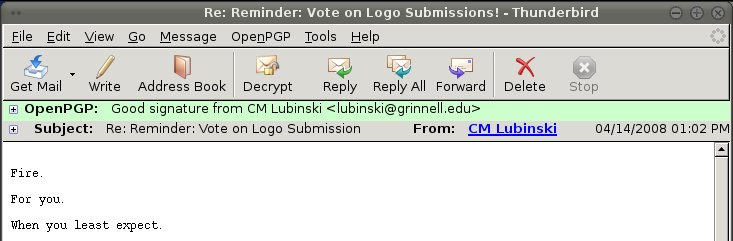
A PGP signature serves the exact same purpose for electronic communication. Of course, a string of letters proves nothing. But when I open a signed message in Thunderbird with the Enigmail extension installed, it looks something like this instead:


That's nice, innit? That green bar means that I can have confidence that these somewhat unsettling threats are, in fact, from CM Lubinski, and he has electronically signed his name to them.

Ok, so you're probably thinking that this is mildly interesting so far, kind of like a poorly-drafted version of Wikipedia, and it sure beats calculus or mopping the kitchen floor or whatever you ought to be doing, but, well, big deal. Dorks like Ian can get all excited about this PGP thing, but you're going to go trawl YouTube for some clips of a baby rabbit eating its own poo. You don't need all this signature stuff, right? Wait! That furry redigester will be there in ten minutes. First, read about...

Why You Need PGP

You need PGP. You're complacent. Things are going smoothly on the internet. Your biggest problem most of the time is the occasional piece of spam that slips through the filters and annoys us for the ten seconds it takes to read "Fr33 V1agr@" and click Delete. But the convenience of technology hides an ugly truth: email is horribly, horribly insecure.

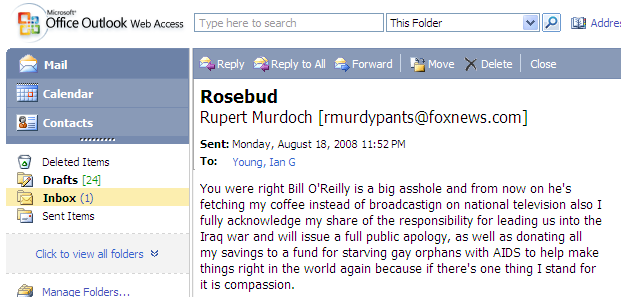
Right now, right this instant, I could send you a message purporting to be absolutely anyone. It doesn't even take that diploma sitting on my bookshelves to do it. The Grinnell mail server and a dirty trick (which I am not going to share) is sufficient. Oh look, good old Rupert sent me something just now:


I (or someone with considerably worse intentions) can pretend to be anyone in email. To illustrate my point further, here's an email coming from a domain name that doesn't even exist (I checked):


It doesn't have to be imaginary email addresses either. I could send a message with a bunch of inappropriate jokes to your boss that looks like it's from you. I promise I'm not going to, but I, or anyone else, could. That's scary stuff. We've seen the tip of the iceberg on this with phishing emails that look like they come from accounts@ebay.com or whatever. People click those fake links by the boatloads and compromise all sorts of financial information. Even smart, internet-savvy people do. Why? Because we're complacent, and no one ever taught us to doubt that the person in the From: field actually sent that message.

Encryption

Scared yet? Here's some more food for thought: ever send private information through email? Like, say, financial information, or your company's business deals, or those emails you get when you register an account somewhere that sometimes have your new password in them. Or even just personal correspondence that you don't want to share with anyone except the recipient.

Guess what - everything you send in email winds its way across the internet in "plain text" - meaning, anyone who looks can read it. If any link in the chain of servers and data lines between you and your recipient is compromised - like someone eavesdropping at your wireless hotspot, or a mail server that's been broken into by hackers, or someone tapping an ethernet line somewhere, or a spying government aided by crony telecoms  - all your email is sitting there waiting to be poked through. Additionally, there's very little oversight of how mail servers (of which any given message may cross through quite a few) are administered, so it's quite possible that your messages will end up sitting on the server or on backup tapes for a long time - quite possibly years.

My point is this: we have no reason to be certain that everyone who gets a look at our email is trustworthy, and yet we send everything totally unprotected from prying eyes. It's like sending all of your bank deposits and love letters on postcards when some of the postmen have no credentials and didn't even pass a background check to get the job.

Luckily, PGP also provides optional encryption. It's like the electronic version of a security envelope. An encrypted messages looks like garbage, just a string of nonsensical letters. It's only when your intended recipient decrypts the message that it becomes readable again.

How PGP Works (the short version)

I want to give a brief overview of how PGP works. This isn't going to be the technical version (I'm not even qualified to give the technical version). It's also not going to be a guide to setting up your computer to use PGP. For that I simply direct you to the two plugins I use and like: Enigmail and FireGPG, and especially the quick start guide for Enigmail, which is really stellar and walks you through the steps of setting it up and using PGP for the first time.   In this article, I just want to explain the underlying concepts so you can see how PGP works, and why it's such a great idea.

To start using PGP, you create a "key pair," which consists of two parts, a public key and a private key. Your public key is something you can give to everyone - you can email it as a file, put it somewhere online, upload it to a keyserver (try searching for my name or email address), whatever. Your private key, as the name suggests, you keep to yourself - it's usually password protected as an additional layer of security. These two keys are tied mathematically. I don't pretend to understand all the details, but it's something to do with factoring primes, and the important point is that it's very quick to go one direction, but incredibly difficult to go the other. So while someone could, in theory, guess your private key using only your public key, it would take the world's fastest hardware thousands of years (yes, human years) to do so. Basically, these keys are pretty secure.

Now, when you write an email and sign it with PGP, the program uses your private key to create a string of letters that is algorithmically tied to the contents of your message. When someone receives your message and wants to verify that it came from you, they take your public key and reverse the process, checking the signature against the message. Verifying a PGP signature assures you that the message came from the owner of the key because only the person with access to the private key could have created that signature. When you want to encrypt something, you take your recipient's public key and use that to turn the message into gobbledygook. That way, only the person with access to the private half of that key (i.e. your intended recipient) will be able to decrypt and read the message.

A Brief Interlude on Trust

There's one more feature of PGP I want to touch on briefly, because I think it's pretty cool: the concept of trust.

I've been going on and on about how secure PGP is, but there's a hole in all this: how do you get other people's keys in the first place? After all, just because someone puts a key up on a public keyserver saying they're James T. Madison, you have no proof that that's actually who made that key. If you downloaded the key from that person's personal website or imported it the first time they sent you a signed message, you might trust that it's who you think it is. If they gave you the key in person, say, printed on a business card, you might trust it a whole lot more. But of course, it's not feasible to get all your keys in person - email is supposed to be convenient.

Keeping that in mind, let's do a quick thought experiment. In real life, you trust Bill because you've been friends with him for ten years and he's always been reliable and honest. Bill has a friend, Jack, who you have never met. But Bill vouches for Jack, and since you trust Bill, you trust Jack (to a certain extent).

PGP has functionality that emulates these sorts of relationships - the phrase "webs of trust" gets used a lot. When you import someone else's key, you can specify how much you trust that key. And, if you choose, you can sign other people's public keys, which is like vouching that they are who they claim to be. So suppose I have complete trust that John Stone's key is legit, because I got it from him in person. I sign Stone's public key. Now maybe CM just pulled Stone's key off a public server. He doesn't know if he should trust it or not. But say CM already trusts my key - since he trusts me and I have signed (vouched for) Stone's key, CM's PGP program knows that Stone's key is reasonably trustworthy.

The Future of Trust

Stop and think about webs of trust for a second. Isn't it a cool idea? This is the power of social bonds, realized in electronic form. Picture a world where everyone uses PGP. Imagine how hard it would become for frauds to work their way into a position to do any real damage when no one will vouch for them. Imagine the freedom to trust, really trust, people on the Internet. This is where I think PGP could take us.

One More Time, Why?

Okay, so I think PGP is important. But why am I signing all my emails with it, when next to none of my recipients are currently equipped to handle it? I have several reasons, most of which are inspired by John Stone's opinions on this topic:
  • Someone's gotta do it. If we all hang around waiting for other people to use PGP first, it will never happen. By signing my messages with PGP, the benefits are immediately available to anyone who sets it up and imports my key.
  • Advertising the functionality. Sending signed messages advertises my public key. If you want to send me an encrypted message, you know I am equipped to handle it, and you can pull my public key from the signed message to use for encrypting.
  • Proselytizing. This is probably my biggest reason for signing at the moment, and is also my reason for writing this post. I hope that some small percentage of people who receive my signed messages will, rather than being confused or just ignoring the extra stuff, be curious and look into PGP, and maybe realize what a great thing it is. I plan to link to this post in the comment section of the signature, in hopes of furthering this goal.

Final Thoughts

Go! Go install Enigmail or FireGPG! Do it! It's fifteen minutes of time now, but after that, they run quietly and unobtrusively in the background. You can do like I do and sign everything you send out, or you can just use it to verify any signatures you get and sign outgoing messages selectively (I guarantee if you send me a signed message, it will brighten my day). You're making yourself safer, and you're furthering a very worthy cause. The Internet is a cool place, people. But it belongs to us and it's our job to keep it respectable. Use PGP.